Experiment Configuration user interface
Contents
Experiment Configuration widget a.k.a. expconf is a complete interface to define all the experiment configuration. It consists of three main groups of parameters organized in tabs:
- Measurement group
- Snapshot group
- Storage
The parameters may be modified in an arbitrary order, at any of the tabs, and will be maintained as pending to apply until either applied or reset by the user.
Measurement group configuration
In the measurement group tab the user can:
- create or remove a measurement group
- select the active measurement group
- add or remove channels of the measurement group
- reorganize the order of the channels in the measurement group
- change configuration of a particular channel (or its controller) in the selected measurement group
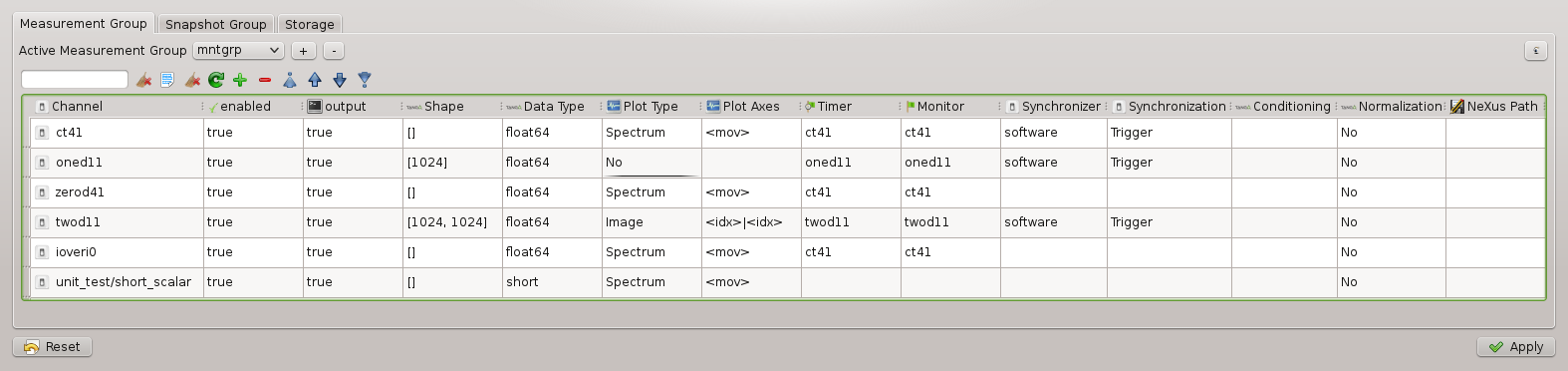
Measurement group tab of the expconf widget with the mntgrp configuration.
Experimental channel configuration
In the measurement group table the user can modify the following parameters of a given channel or its controller:
- enabled
- output
- shape
- plot type
- plot axes
- data type
- plot type
- plot axes
- timer
- monitor
- synchronizer - the element that will synchronize the channel’s acquisition. Can be either a Trigger/Gate element or the software synchronizer. Configurable only for the timerable controllers. Applies on the controller level.
- synchronization - the synchronization type. Can be either Trigger or Gate. Configurable only for the timerable controllers. Applies on the controller level.
- conditioning
- normalization
- nexus path